Showing posts with label Illustration. Show all posts

Thursday, February 26, 2015

The Fox Merchant

The Fox Merchant

Hi there folks! If you're reading this, you're probably aware that this is the first post I've done since October of last year! I miss my old blog, and I've neglected it. I hope to post some more things on here in the future. I'm in the process of making new art, negotiating future projects and staying busy. But that's no excuse to do some drawings here and there and share them with you! 
This little guy was suggested by a follower of mine on twitter, and I enjoyed drawing him. It's just a doodle I did in my Moleskine sketchbook. I then scanned it into Photoshop and laid in some values in greyscale with a gouache brush by Kyle T. Webster (I would highly recommend his brushes, they're excellent!) 

I'm wanting to add more kid lit characters to my portfolio and my coming website (stay tuned for that), and I can envision this being used for an interior for a magazine or chapter book? Anyway, it's a start! So until next time, thanks for reading!

-Will


Sunday, July 6, 2014

Story Warren - Guest Illustration


Hi there gang! Here's a quick blog post to tell you about a thing I did a few weeks ago - an illustration for Story Warren, a website devoted to fostering children's imagination through storytelling. You may have already seen the story that ran on June 27th, but if you'd like to check out the full post you can find it here.

It was a super fun piece to work on, and I really have to thank Zach Franzen for not only asking me to do the piece, but also providing some excellent art direction! Looking forward to possibly doing more for Story Warren in the future.

In the meantime, I have got lots of things going on, like potential new projects in the works! I'll try my best to keep you updated with new work - I know the blog has been dormant for a while. I just returned from a 10-day tour of Scotland as well, which was magnificent and life-changing! I'm hoping to post some photos from that just as soon as I can, but for now, check out this blog for a general idea of what we did: http://www.douglasbondbooks.blogspot.com/

Monday, February 24, 2014

Pecos Bill: Comic Book Cover Process


Right after Christmas I was invited to contribute a variant cover to the Pecos Bill kid's comic book series created by Brian DuPont. Brian's Pecos Bill series explores the possibility that the legendary Pecos Bill lived throughout the centuries, and still has tall-tale adventures in the modern era. Throw in a steam-powered jet-pack named Widowmaker (created by inventor Nikola Tesla), and you have a pretty exciting adventure series.

The idea really appealed to me, so I went to work on a cover for Issue #3. The style I ended up with was a lot different than the work I usually do, but I was pleased with the finished product. I painted it from start to finish entirely in Photoshop.

Here are some progress shots to give you a small taste of the way this thing was put together:

I started out with a really tiny thumbnail sketch or two, and a digital color comp (that's pretty important in any color work I do. Really serves as a guide when I go into the painting stage).


The linework, completed digitally. This was a new step for me, but digital comic art linework is actually pretty great, especially if you have a brush that has a bit of variance and texture in it to simulate a real pen. I used one from this set by Shaun Bryant: https://gumroad.com/shaunbryant 


This is a pretty big jump from the last image, but hopefully you sort of get the idea. I start out with painting large areas of flat color. Then I use those areas as selections in order to paint details, more color, and texture over the flat color. The background is made up of some gradients, spatter brushes (for stars) and hand-painted comets! (soft brush+texture brush for tail). Nothing fancy!

So there you have it! I had to complete the entire piece in about 3 weeks in order to meet the deadline, so that was a challenge. I look forward to exploring comics further in the future. 

In the meantime, consider contributing to Brian's Kickstarter campaign - you can receive a print copy of my cover if you donate a little more! Check out the campaign here: 


And you can learn more about Brian and his comics here: 


Thursday, February 20, 2014

Fisherman's Song


As you may recall, last year I completed a new series of four new drawings to add to my portfolio. These were also included in the sketchbook "Drawing the Sword" which I also released last year. As part of that effort, I began coloring these pieces digitally. This was the only one I completed, but I really enjoyed the process, and I love the way the colors came out on it. I also submitted this piece, along with my Winter Dragon piece to the Spectrum Annual this year. It was my first submission to the publication.


Above is a bit of the progress that took it from basic idea to finished drawing. Unfortunately I don't have any WIP shots of the coloring process, but basically it involved large areas of flat color, then working my way up to the highlights and details with some various color adjustment layers over the finished color.

I wanted to convey sort of a carefree summer feeling with this piece. My brothers and I spent countless summer days exploring creeks and woods together when I was a kid. It's good to get out and explore your world. It makes you feel truly alive. That's what this Fisherman is up to with his turtle friend. They're just out there to enjoy the fresh air and to have a good time with each other!

Hope you like it!

-Will

Wednesday, February 12, 2014

Sketch Dailies: Sherlock


Hi everyone! It's been too long since my last blog post, so I apologize. Here is a quick thirty minute sketch I did today for "Sketch Dailies", a sketch challenge over on Twitter. Sherlock Holmes has long been a favorite of mine. I love A. Conan Doyle's stories, and I have several different volumes of Holmes' adventures. I will occasionally break them out and dive into the London Fog along with the sleuth and the ever faithful Dr. Watson (preferably on rainy, windy nights like tonight!) Anyway, this was just a super fast drawing in my sketchbook with some Photoshop icing on top. Also, you'd be surprised how much contrast and mood you can get using only 3 colors...

In other news, I've been working on projects that I haven't had time to post about (more soon maybe?). I just completed a variant comic book cover for an indie comic artist, which was a lot of fun. I'm in negotiations to begin illustrating a collection of short stories for a local author. I'll be doing some interior illustrations along with a full-color cover. It's going to be a bit time-consuming, and the deadline is in April, so I'm eager to get started soon. 

And finally, I submitted to Spectrum for the first time! It's doubtful that I'll be accepted into the annual book, but the act of submitting was a big deal for me. I submitted two pieces that I did last year. I'll keep you posted on any news about that.

Okay! Well, glad you stopped by! Hope to have more art up soon. Now, back to painting! 

Cheers,

-Will

Saturday, January 11, 2014

Bird of Paradise - Experiment in Gouache

A quick color experiment in gouache from the other night. Didn't have a specific purpose in mind for this one, except to try out the new gouache set I got for Christmas! I absolutely love gouache. I think I'll be using it much more in the future. It's easy to achieve bold color with, and you can work in some cool textural effects. However, this style is certainly not original to me, and I don't know if it's a style I really have any business working in. Anyway, what do you think?

In other news I visited this amazing Donato Giancola exhibit in Huntsville, AL today. It was terrific, and I couldn't believe how nearby an exhibit of this caliber was! It was definitely worth the trip. If you're going to be in or around Huntsville before January 19th, be sure and check it out.

Monday, December 23, 2013

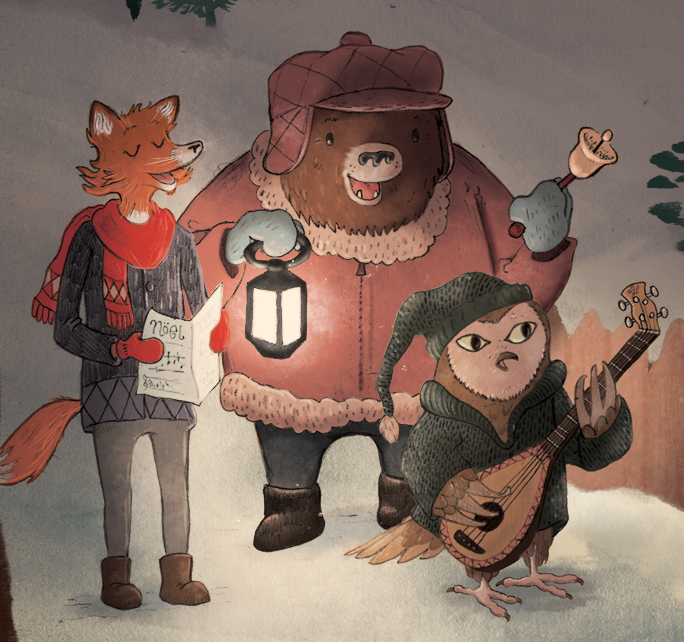
Carolers Process: Finish! (And a Merry Christmas to All of You!)

Tidings of Comfort and Joy

Here we are - the final! 
When we left off last post, I had just begun adding color to the painted elements that I had composed in the image. Now, many layers later, I've arrived at my finished piece. The basic process is just a lot of tweaking, color choices, adjustment layers (Overlay for the light areas) and texture brushes.

I hope it looks okay here on the web - I had some issues making sure that the color translated well to the web version (I painted it in CMYK, so I ended up exporting it as a PNG to make sure all the color information was intact.) I really enjoyed exploring this new method of working, and to be honest, I've learned a lot with this painting, and you'll be seeing much more of this process from now on!
 I'm really excited about this piece, and I look forward to exploring new territory in the New Year.


  So, I wish you all the Merriest of Christmases. I'm thankful for all of you and for this great gift of Illustration that we can share with each other!


PS: Today I opened my mailbox to find a lovely gift from illustrator Joe Sutphin! Inside were these beautiful signed prints and a kind note. Joe is a fantastic illustrator, and if you aren't familiar with his work, be sure and check it out here: http://joesutphin.blogspot.com/

Wednesday, December 11, 2013

Carolers Process Part II: Digital Composition & Coloring

 Hey guys! So, I haven't had a lot of time to work on this piece since the last time I posted, but I made sure to take some WIP shots of the compilation stage. Basically, I'm painting elements of the image separately, and then compiling them into a composition that I am happy with. 
 So, let's jump into it!

In the image above, I've scanned in a page of painted elements. They were all done in watercolor. After I scan these into the computer, I open the image in Photoshop where I convert it to black & white (or, Image > Adjustments > Black & White). Then I adjust the Levels until I have mostly black and a completely white background. In the images here, I actually made my levels too grey, which forced me to go back and re-do a lot of my work because the grey areas became transparent. (more on that later).
Also, note the cluttered desktop, and the Cory Godbey desktop background :)

Now I'm ready to copy everything to its own layer!

 This is a slow process. It's a good idea to have some music on to keep you motivated! (I've been enjoying the new Sigur Rós album, some Christmas music, whatever helps me work!) At this stage, I use the Lasso tool to select the element I want. I then Command + click on the RGB Channels in the Channels palette. I then invert the selection (Shift+Command+I) and make a new Layer. I then fill the selection with Black (Alt+Delete). After all this is done, I select all and copy to a new layer in my painting, and then place the new layer on Transparency Lock (it's a little button on the layer palette).
This might sound like a complicated process, but it doesn't take too long when you get it committed to memory.

Now all the elements are ready to be re-sized and moved into position.

Now that each of my elements are on their own layer and on transparency lock, I can start arranging them into a pleasing composition. This step seemed to take the longest. During the process I referred to my rough sketch frequently to make sure things were where I wanted them. Also, you'll notice that everything is a bit too transparent. That's because I didn't get the blacks dark enough in the previous Levels stage. That's important! But you can see that I'm starting to lay out the scene like I want it.

Since my layers are on Transparency Lock, this means I can color them however I want without having to do any complicated selections, so everything stays neat and tidy. At this stage, I'm just laying down basic colors. I've also discovered how to make some decent texture brushes, which I'll be using to add more color and texture to the final image. The characters are being colored here with just a flat color layer underneath the line work.

____________________
So that's about it for this stage! My goal is to have this image finished by next Wednesday, so watch this space for the final image soon. Let me know if this tutorial-type stuff is interesting to you. I want to try to give you all a glimpse into what I'm learning in hope that you'll in turn learn something as well.

And finally, I want to thank Chuck Groenink for his kind advice that he's given me personally and through his blog. I have been very inspired by his work lately, along with many others. The new methods of working I've been experimenting with are largely influenced by his paintings. Be sure and check out his work here: http://cargocollective.com/greenink

Next Time: Final Color & Texture!

Tuesday, December 3, 2013

Carolers Process Part I: Thumbnails & Drawing

 
Here's a new personal piece I'm working on. I'm going to be chronicling the new methods that I'm trying out lately here on the blog, so I hope you'll enjoy following along as I get this one put together!

For this first stage, I started with a very quick thumbnail. I had one idea in my head, and it worked pretty good in the first sketch, so I went with it. I scanned this sketch into Photoshop, where I hastily added some values on top of it. This is what I'm referencing mainly as I work on the image.


On this piece, I'm going to be creating the image with separate "parts". So instead of just putting all the line work down in one drawing, then painting it, I'm painting and drawing elements of the whole image separately so I can rearrange and edit the final piece in Photoshop.

I did each of these main character drawings in about 40 minutes.


For the next stage I'll be scanning these into Photoshop, 
adjusting levels, and separating the line work!


Next Time:  Painting, Compiling and Adjusting!

Monday, November 25, 2013

Drawing the Sword Thanksgiving Giveaway!

https://www.etsy.com/shop/willkellyart

Hi Everybody!

In celebration of my newly opened Etsy shop, and in honor of the Thanksgiving
holiday, I'm holding a giveaway!

Prizes include:
 
Hand-signed copy of my new sketchbook 
Set of (6) Christmas Cards
and
(1) Hand-signed Pilgrim Girl print 

Feel free to enter any of the listed ways!

Also, now until Nov. 30th you can get free shipping on any order of $15 or more in my Etsy Shop by using promo code:

THANKS2013

Good luck, Happy Thanksgiving, and thank you for your support!

-Will


Saturday, November 23, 2013

New Directions: Part I

Here's a quick painting I did this afternoon. It took me around 2 hours. 

Lately, I've been very inspired by illustrators like Chuck Groenink, Meg Hunt, and Jon Klassen who create very texture-driven, more simplistic illustrations. This method of creating an image is really interesting to me, and I am really eager to explore the relationship between simple drawings and hand-painted textures and the final Photoshop image.

Overall, I'm pleased with the direction this image took. It's got a little more playfulness, color and texture, and that's what I'm aiming for. I think it's good to try to stretch yourself in new directions in your own work, and that's what I hope to do with the next several pieces. I hope to post more of these in the next week or so as I continue to explore new methods of working.


Monday, November 18, 2013

Drawing the Sword: A Collection of Drawings by Will Kelly


Ladies and gentlemen, I would like to present to you my 2013 Sketchbook!

_________________
After many long months of planning, work and preparation, I'm pleased to announce that my newest personal project Drawing the Sword: A Collection of Drawings is now available on Etsy!

I am so thrilled to be able to offer you this small glimpse into my creative world, and my imagination. It has been a fantastic project, and I'm so excited that I have achieved this creative milestone. And I'm equally thrilled to see where my work will go from here!

A brief description from Etsy:

"Drawing the Sword" is the first-ever printed collection of work by illustrator Will Kelly. Part I is a series of 4 brand-new drawings created specifically for this book. Part II is filled with drawings from 2012 and 2013. This 32-page sketchbook is filled with things Will loves to draw - animals, knights, castles, forests. He hopes you enjoy this peek into his imagination!

Drawing the Sword: A Collection of Drawings by Will Kelly

32 pages, perfect-bound soft cover.

NOTE: The first 10 books sold will include a numbered, hand-signed sketch in the front!

All books are hand signed by Will. 

Get your copy here, along with other original drawings, paintings, and other cool stuff!


Wednesday, November 13, 2013

2013 Sketchbook: News Update and WIP!


Because it is mere days until I hope to offer my new 2013 sketchbook (and due to the fact that I simply cannot wait!) I wanted to drop in a little sneak peek of a WIP painting I've been working on the last several days.

This piece entitled "Fisherman's Song" will be included in its black and white form in my forthcoming sketchbook. A color version (which you see above) will be included in a digital version of the sketchbook, which will include some bonus content, and will be available for download on Etsy. The plan is to offer the physical sketchbook, as well as a digital version which will include a few color paintings. The above painting will also serve as a promotional postcard, which I plan on sending to art directors, etc.

The above piece was created to be a part of a series of 4 new drawings that I created specifically for this personal project. I did them all over the course of The Lamp Post Guild's "Art of Personal Work" with Cory Godbey. I would strongly recommend you take this class if you're interested in building your portfolio, getting the attention of potential clients, or just interested in developing your voice as an artist in general. I cannot stress enough how beneficial this class was in my pursuit of illustration as a career, and I hope some of you will find it to be helpful as well!

Our Fall Class begins on Nov. 18th, 2013, and registration is open! You can sign up at http://lpg.pathwright.com/school/catalog/course/the-art-of-personal-work-cory-godbey/

and you can find an article by Cory on the importance of personal work (and a discount code!) here:

Thanks for reading, and I will be posting more soon!

-Will


Saturday, November 9, 2013

Photoshop Character Study: Professor

Decided to go in a bit of a different direction with this one.

Photoshop allows me to really play around with shapes - I can endlessly create shapes on separate layers, then pose and adjust them until I get a finished product I'm pleased with. 
I'm always really nervous when the topic of "style" comes up, but I really have a huge interest in doing kid's books, so this particular "style" is something I'm toying around with. I'll do a super fast sketch in my sketchbook to get the basic feel of the character, then start immediately composing on the computer. It's a fast and fun process...

Also, I'm interested in playing with color more lately, and Photoshop offers great tools for that. You may be seeing a lot more of this type of work in the future. Stay tuned!
___________________________

P. S. : ALSO! Sketchbooks have been ordered! Watch this space for more information on getting yours in the next week or so!

Tuesday, August 27, 2013

Beauty & the Beast: Watercolor

Taking a quick break from some LPG sketchwork to post my progress on the Beauty & the Beast piece that I worked on over the course of the TLC Workshop weekend before last. This is the final watercolor, with just one or two adjustment layers in Photoshop to bring life back into the scanned image.

I'm pretty pleased with the overall painting. Personally, I feel like this is one of the best "finished" watercolors I've ever done, although there is a great deal of room for improvement here. I really need to work on my application of the media - I tend to just mush the paint around with no objective for the strokes. In future paintings, I'll be trying for smoother layers of color.

The next step will be digital adjustments. Happily, I think I've gotten much more color information down in the painting than in the Winter Dragon one I did last time. Hopefully that will make the digital stage much easier!

Anyway, that's about it. What do you think? Keep at it, or go into a career in the Fast Food industry?

(JUST KIDDING)

Wednesday, August 21, 2013

TLC Workshop Recap: Monsters & Maidens

  
This past weekend I had the privilege of attending the TLC Workshop with Justin Gerard and Cory Godbey. It was a terrific weekend full of good friends, great artwork, and lots and lots of knowledge passed around! These are just a few photos from a very full weekend.

_________________

(Above) Justin Gerard demonstrated some methods of picture-making that he uses frequently, including techniques blending ink and watercolor that were used by Arthur Rackham (if you're interested in this method, a detailed description of it can be found here.)


Iain McCaig, who has worked as a concept artist for Star Wars and many other feature films, stopped by on Saturday to give us an energetic and inspiring talk on telling stories with our art and character design.


The "digital room" where I worked. The Arts Umbrella where the workshop was held was a terrific space. Small, but just right for a workshop this size.


This was the state of my Beauty & the Beast piece on Saturday night. Lots of reference lying around, and I had Just got the drawing transferred to watercolor paper and refining it. I had a pretty rough time deciding on a composition that worked for me,  so by this time I was ready to commit to a drawing just so I could try out some new watercolor methods.


Justin worked on a Beauty & the Beast illustration that was absolute dynamite. It was really nice to be able to see him work in watercolor over the course of the weekend, and I learned a great deal about the actual application of it, which has been something I've been pushing to learn recently. Justin was eager to share all kinds of knowledge about illustration and his working methods.

And here's a sneak peek photo of my drawing. It has lots of issues, but I pressed on. I told myself I couldn't go home until I had gotten watercolor on the page, which I did! I still need to finish that aspect of it, and I'll post the final when it's done.

And lastly, here's Mr. Cory demoing his digital workflow in Photoshop which he uses mainly for client work. Cory is a fine fellow, and it was great to hang out with him for the weekend. His drawings are mind-blowing works of art and I enjoy his approach to character and composition.


At the end of the class on Sunday, Justin & Cory did a Q&A with us on the business of art, how they got their start in illustration, and things that we as new artists can do to gain exposure and attention for our own artwork. It was a great session, and it really answered a lot of questions that I've had in the recent months about "where do I go from here?"

After it was over, we all took a look at each other's pieces. There was some terrific art being made over the course of the weekend. That evening we attended a farewell dinner at Vivendo's Italian Restaurant in the Country Village and it was so nice to just spend time with good friends who love art. We're all in this together! 

If you ever get the chance to attend one of Tara Larsen Chang's TLC Workshops, I would highly recommend it, especially if the guest illustrator is someone who has influenced you in your art pursuits. For me, Justin and Cory's work was a huge factor in my decision to become an illustrator, so it was a great opportunity to meet with them and learn from their work and experience. I hope that you will be able to do the same if you attend.

And with that, it's back to work for me! I have a painting to finish!

Saturday, August 3, 2013

Buried Treasure - Illustration Process


Here's a quick piece I did. I've been really inspired lately by children's book illustrators like Jon Klassen and Isabelle Arsenault. Their work has such amazing texture and simplicity. I love it. I'd like to explore this type of work more fully.

I took a different approach. This guy was doodled in my sketchbook. I took a piece of watercolor paper, and painted all the different pieces I knew it would take to create him. Here's that page:


I then scanned all of this into Photoshop, and put every piece on its own layer. By doing this, it allowed me to maneuver all the pieces into place, re-size them and get it how I wanted it. A few color adjustment layers, and I was done! Below is a little .gif animation that shows the process:

What do you think of this style? I'm eager to explore this technique further for use in children's books, etc. Hope you like it!

Monday, July 29, 2013

Winter Dragon: Digital Finish

Winter Dragon - (watercolor & digital, 2013)

At long last, I have finished the Winter Dragon. 
What you see above is the result of close to 120 Photoshop layers, and much wrestling with color, lighting, pixels, adjustments, gremlins, and other adverse entities bent on making the life of a picture-maker total chaos.

It finally came to the point where enough was enough. There is only so much I can do to this image to make it successful. Ultimately, I felt like I was working very hard to offset the effects of a lack of planning in the early stages. This was a very uncomfortable feeling. 

Also, as layer upon layer began to accumulate in my palette, I began to ask myself: "why so many layers? Why is it taking this many layers to get this point across? Why wasn't there more color in the watercolor stage?" and on and on. A simple idea was requiring 20x the effort, layers, thought, and tweaking than it ever should have.

So to sum it up, I feel like in this painting, I won some and I lost some. In some ways it feels like it is succeeding, but in other ways it feels like it falls short of my original idea. But I'm ready to put this one behind me, and move on to bigger, better things.

Or maybe simpler things. If there's one thing this painting has taught me, it's this: Less is, more often than not, more.